New models arrive almost weekly. Here is how to decide when the default is enough, when a different option is worth it, and how to tell a lab announcement from what you can actually use in Microsoft 365.
For team leads and users deciding when more model choice helps.
Quick summary
- Start on Auto. For most everyday tasks, a more capable model does not change the result.
- Choose deliberately when a task is long, draws on many sources, or carries real consequences, and compare the results.
- A lab release is not the same as availability in your Copilot. Licence, region, rollout and admin settings decide what you see.
Start with Auto
Microsoft builds Auto around an idea it calls saturation: the point where a more capable model stops changing the result, because the task never needed it. Turning a meeting transcript into bullet points or summarising a colleague’s document are good examples. Auto weighs accuracy, speed and cost on each request and routes it to a suitable model and level of reasoning, so you do not have to choose.
When a different option is worth it
- Reasoning: the task needs several steps of analysis, not just rewording.
- Context: the answer depends on many documents, emails or meetings at once.
- Stakes: a mistake would be costly. Test whether a more capable model improves the first draft; keep expert review for consequential output and do not assume that review will take less time.
- Duration: the work runs for a long time across tools, which points to Copilot Cowork and usage billing.
When you do switch, run the same prompt on Auto and on your chosen model, compare the two, and keep a note of which tasks genuinely benefit.
A task-to-choice guide
| Task | Reasoning | Context | Speed | Review | Starting point |
|---|---|---|---|---|---|
| Summarise a document or meeting | Low | One source | Fast | Check source accuracy; review depth depends on consequences | Auto |
| Draft a reply from an email thread | Low to medium | One thread | Fast | Tone and facts | Auto |
| Explain variances in a workbook | Medium | One workbook | Moderate | Check formulas | Auto; try a more capable model if the answer is shallow |
| Brief from many files, emails and meetings | Medium to high | Many sources | Can wait | Every citation | A Copilot Notebook; consider a more capable model |
| Multi-step assignment: research, draft and slides | High | Many sources and tools | Runs long | Owner reviews output | Copilot Cowork, on usage billing |
| Hardest reasoning with high stakes | Highest | Varies | Can wait | Expert review | A frontier model on usage billing, if your policy allows |
This is deliberately not a league table. No single model is best for every task, and the right choice changes as models and limits change.
Lab announcement versus availability in Copilot
AI labs announce models on their own schedule. Microsoft then brings some of them into Copilot, sometimes the same day, sometimes later, and often in phases. Keep the two apart.
| Date (2026) | Lab announcement | In Microsoft 365 Copilot |
|---|---|---|
| 1 Sep | Anthropic: Claude Fable 5.1 and Claude Mythos 5.1 | Microsoft names Fable among the frontier models on usage billing (25 Sep). Mythos 5.1: general Copilot availability not confirmed in the cited announcements. Microsoft administration documentation refers to Mythos 5 but does not establish general availability for Mythos 5.1. |
| 3 Sep | OpenAI: GPT-6 Astra | Named among the frontier models on usage billing (25 Sep). |
| 22 Sep | Anthropic: Claude Opus 5.5. OpenAI: GPT-6 Sol | Rolling out from 22 Sep across Word, Excel, PowerPoint, Chat, Cowork and Copilot Studio. |
| 28 Sep | Anthropic: Claude Sonnet 5.5 | From 30 Sep in Cowork and Copilot Studio (usage billing); Word, Excel, PowerPoint and Chat in phases under the user licence, with limits. |
| 29 Sep | OpenAI: GPT-6.1 Sol | As for Sonnet 5.5, from 30 Sep. |
| Included | In the user licence (25 Sep) | GPT-5.6 and Claude Sonnet 5 were named as included. The 25 September announcement said newer models such as Claude Opus 5 would be included with limits. |
Checked 1 October 2026. For the latest position, see Microsoft’s AI at Work roadmap and the Copilot release notes.
How your organisation’s settings shape the choice
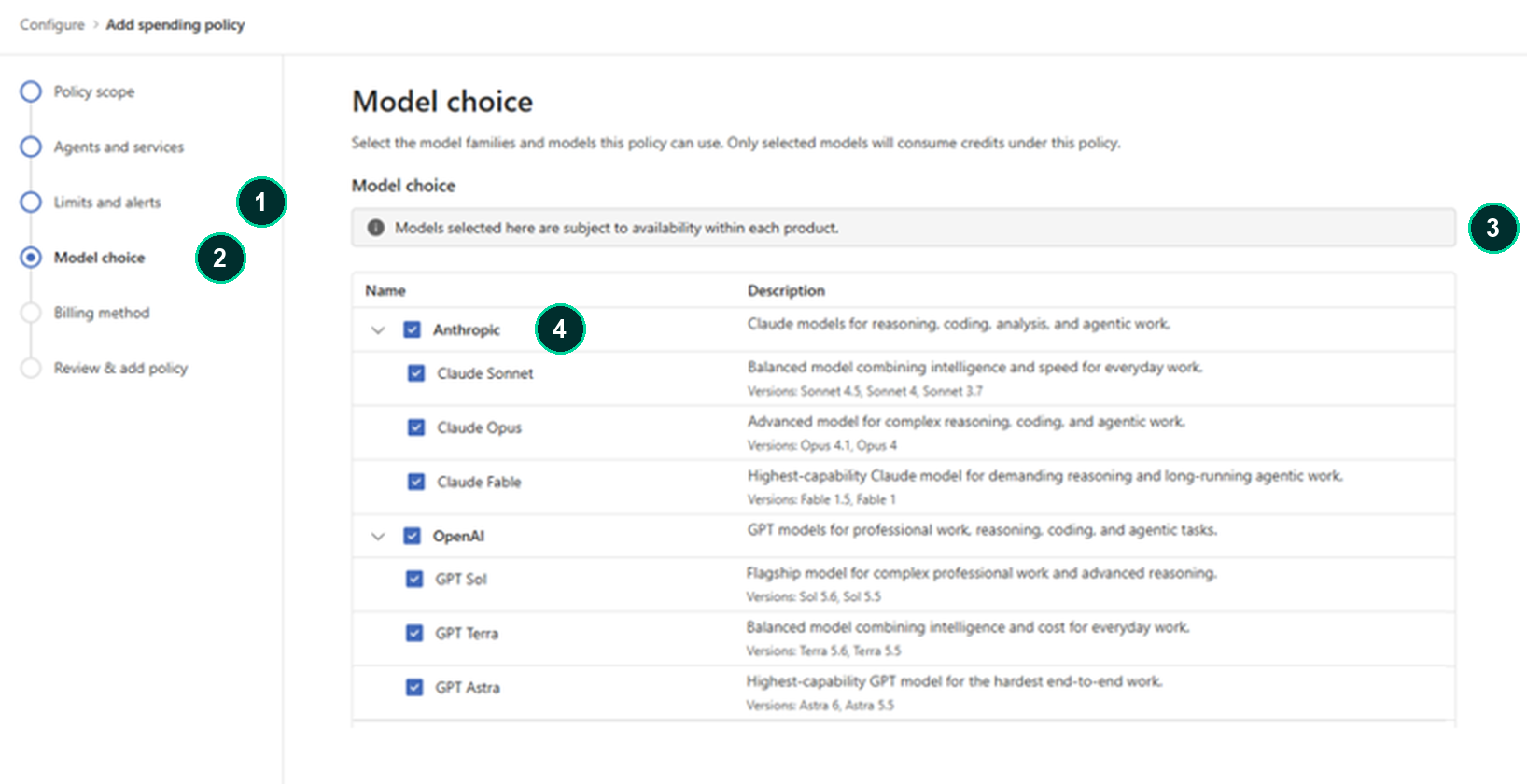
What you see in the model picker is not only down to Microsoft’s rollout. Microsoft notes that availability varies by licence, access and region. Admins can also tailor which model families each group can use through spending policies, starting with Cowork, and that setting also limits which models Auto can select in Cowork.
Open image at full size
A simple routine for teams
- Start on Auto for everyday work.
- If a result is shallow, rerun the same prompt with a more capable model and compare.
- Note which tasks genuinely benefit, and share that with your team lead.
- Move long, multi-step assignments to Cowork only within your organisation’s spending policy.
Availability
- Model choice is part of the Microsoft 365 Copilot user licence; some newer models carry usage limits.
- GPT-6.1 Sol and Claude Sonnet 5.5 began rolling out on 30 September 2026, in Cowork and Copilot Studio first, then in phases across Word, Excel, PowerPoint and Chat.
- Availability varies by licence, access and region, and by your admin’s settings.
Reviewed 2 October 2026. Rollouts are phased; confirm availability against your licence and current Microsoft guidance.
Frequently asked questions
Which model is best?
It depends on the task. For most everyday work, Auto gives the best value without you choosing. Pick a specific model when a task is long, complex or high stakes, and compare.
Is a newer model always better?
Not for every task. Many everyday tasks are already saturated, so a newer model may give the same result.
Why can’t I see a model I have read about?
Lab announcements and Copilot availability are separate. Rollouts are phased, and your licence, region and admin settings affect what appears.
Does choosing a model cost extra?
Within the user licence, model choice is included, with limits on some newer models. Near a limit you can switch back to Auto at no extra cost, or move to credits if your organisation allows.
Related on Braintree
AI Jumpstart: connect your AI plans to your business strategy
Sources
Microsoft Copilot Blog. More Models, One Copilot. 22 September 2026
Microsoft FinOps for AI Blog. New FinOps for AI capabilities. 25 September 2026
OpenAI. Introducing GPT-6.1 Sol (29 September 2026)
Microsoft Learn. Connect to AI models from other providers. Accessed 2 October 2026.