Microsoft now prices Copilot in two parts. Here is what sits inside the per-user licence, when usage billing applies, and who in your organisation should control the spend.
For business owners, finance leads and Microsoft 365 administrators.
Quick summary
- Everyday AI work stays on the Microsoft 365 Copilot user licence, priced per user per month.
- Longer, more demanding work, such as Copilot Cowork and agents that run for hours, uses usage-based billing with Copilot Credits, on top of the licence.
- For enterprise customers, these usage-billed services remain off until an admin creates a spending policy. Once enabled, review the policy scope, limits, alerts and billing method.
What changed on 25 September
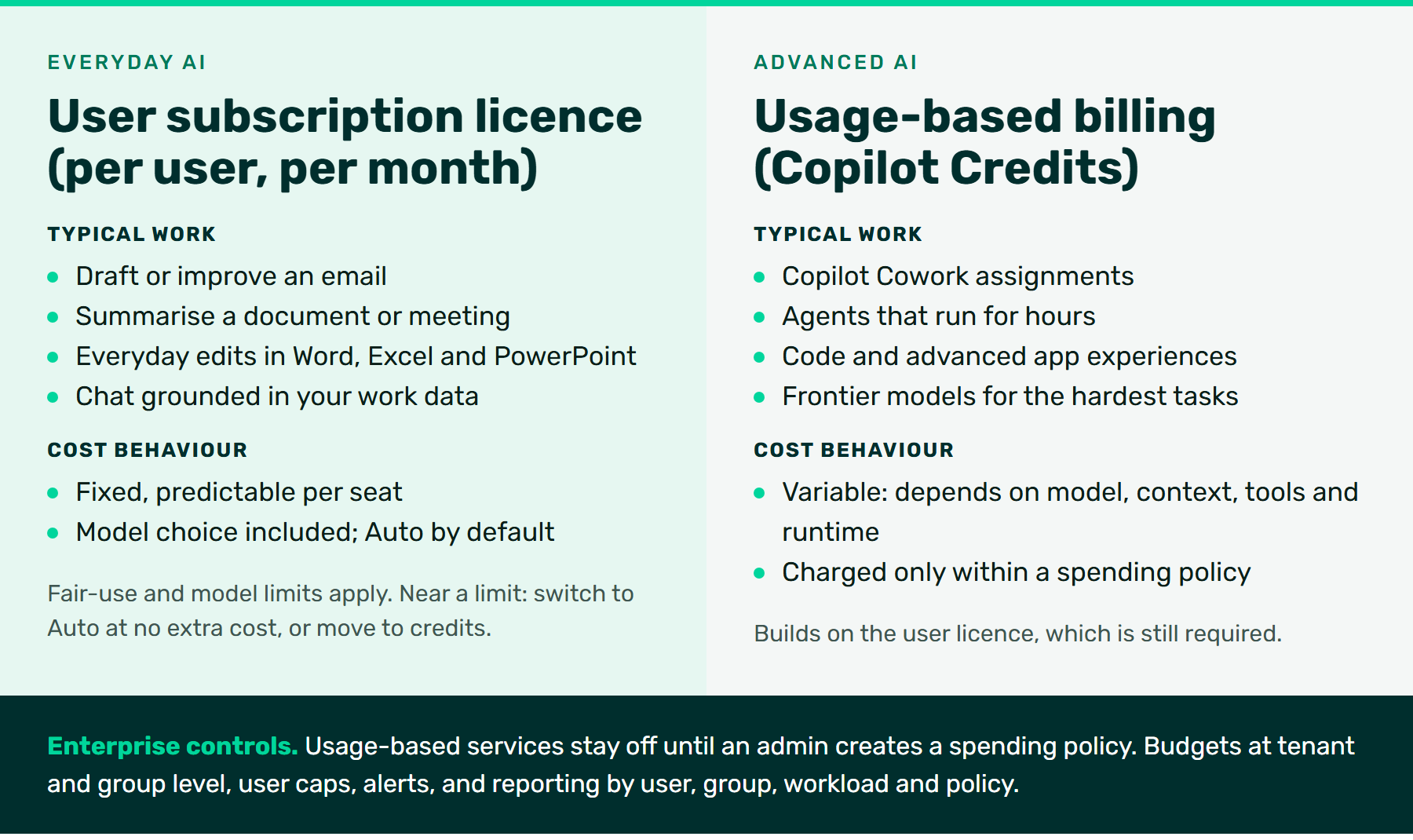
On 25 September 2026 Microsoft set out how Copilot will be priced as AI takes on more of the work itself. It combines two models: a predictable per-user licence for everyday AI, and usage-based billing for advanced work. Microsoft compares it to a plug-in hybrid. The licence is the battery that covers most of your driving at a fixed monthly cost; credits are the fuel tank for trips that need more range.
Open image at full size
Everyday AI: covered by the user licence
The Microsoft 365 Copilot user subscription licence is priced per user per month. It covers the everyday work you do with Copilot alongside you: summarising a document, drafting an email, turning a meeting into action points, and everyday edits in Word, Excel and PowerPoint. Microsoft says there are no changes to the value already in the licence.
Model choice is part of the licence. Auto, the default in the model picker, weighs accuracy, speed and cost on each request and routes it to a suitable model and level of reasoning. In the 25 September announcement, Microsoft named GPT-5.6 and Claude Sonnet 5 as included and said newer models such as Claude Opus 5 would be included with limits. On 30 September Microsoft added that GPT-6.1 Sol and Claude Sonnet 5.5 will roll out in phases across Word, Excel, PowerPoint and Chat as part of the licence, also with limits.
Fair use still applies. Microsoft is setting usage limits it expects the vast majority of people never to reach. Anyone who does gets a warning first, then a choice: switch to Auto at no additional cost, or move to credits.
Advanced AI: usage-based billing with Copilot Credits
Advanced AI is work you hand off rather than work you do with Copilot beside you. Microsoft lists Copilot Cowork, Code, Autopilot, new advanced experiences in apps such as SharePoint, and frontier models such as Fable and Astra. This work runs on usage-based billing with Copilot Credits.
Two points matter for budgeting. First, usage billing builds on the licence: people still need the user licence to access these capabilities. Second, the cost is variable. In its own cost modelling, Microsoft calculated Cowork costs using variable rates based on the model, the context, the tools used and the runtime. A short task on a smaller model uses fewer credits than a long, multi-step assignment on a frontier model.
Two worked examples
| Example | What happens | Cost behaviour |
|---|---|---|
| Summarise a 20-page supplier agreement into obligations, key dates and renewal terms, in Word | Everyday AI. You stay in the document; Auto picks the model; you check the summary against the agreement. | Fixed. Covered by the user licence you already pay for, within fair use. |
| Ask Copilot Cowork to compare last quarter’s pipeline report with the related email threads and meeting notes, then draft a board summary and slides | Advanced AI. A delegated assignment that may run for a long time across several sources and tools. | Variable. Uses Copilot Credits within your spending policy; cost depends on model, context, tools and runtime. |
We have deliberately not put rand figures on these examples. Credit consumption depends on your agreement, your configuration and how each task runs. Your Braintree account manager can model it against your own licensing.
Who controls the spend
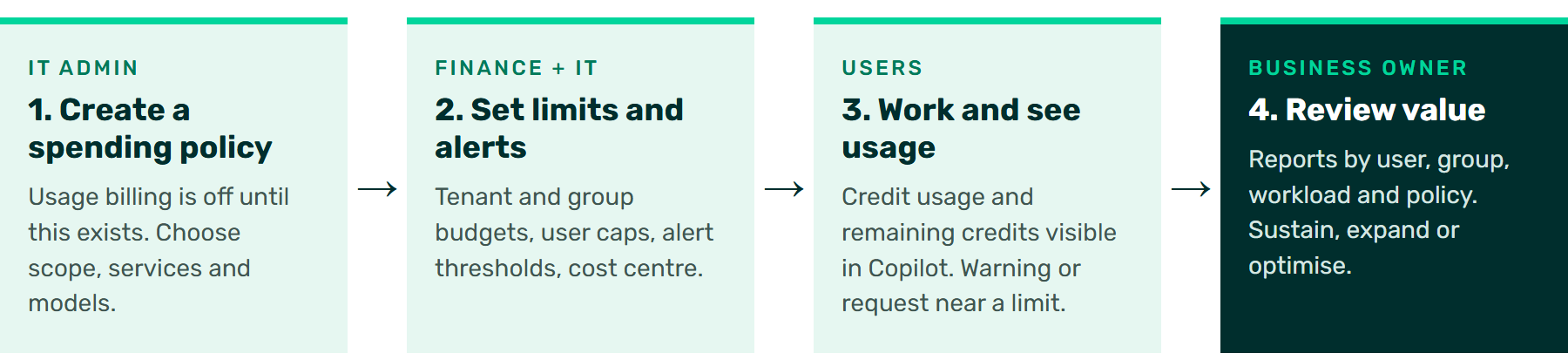
For enterprise customers, usage-billed services are visible in the product but stay off until an admin creates a spending policy in the Microsoft 365 admin center. Billing for those services begins only after that policy is in place. The policy is where the decisions are made:
- Scope and services: which users, groups and workloads can use usage billing.
- Budgets and caps: tenant-level and group-level budgets, with user-level caps inside group policies.
- Alerts: notifications when spend reaches a threshold you set.
- What users see near a limit: a warning, a way to request more, or no prompt at all.
- Where the cost lands: spend can be assigned to Azure subscriptions or resource groups, so AI appears in each department’s existing budget.
- Reporting: usage by user, group, workload, policy and payment method.
Microsoft added more controls on 25 September. Cost management now covers Code and Copilot Managed Runtime alongside Cowork and the Work IQ APIs, with Copilot Studio agents joining in October 2026. Admins can tailor which model families each group can use (rolling out in Cowork first). Consumption insights show which Cowork scenarios drive credit use, policies can be managed through the Microsoft Graph API, and people can see their own credit usage in Copilot. Microsoft says cost management in Agent 365 is included with your Microsoft cloud subscription.
Open image at full size
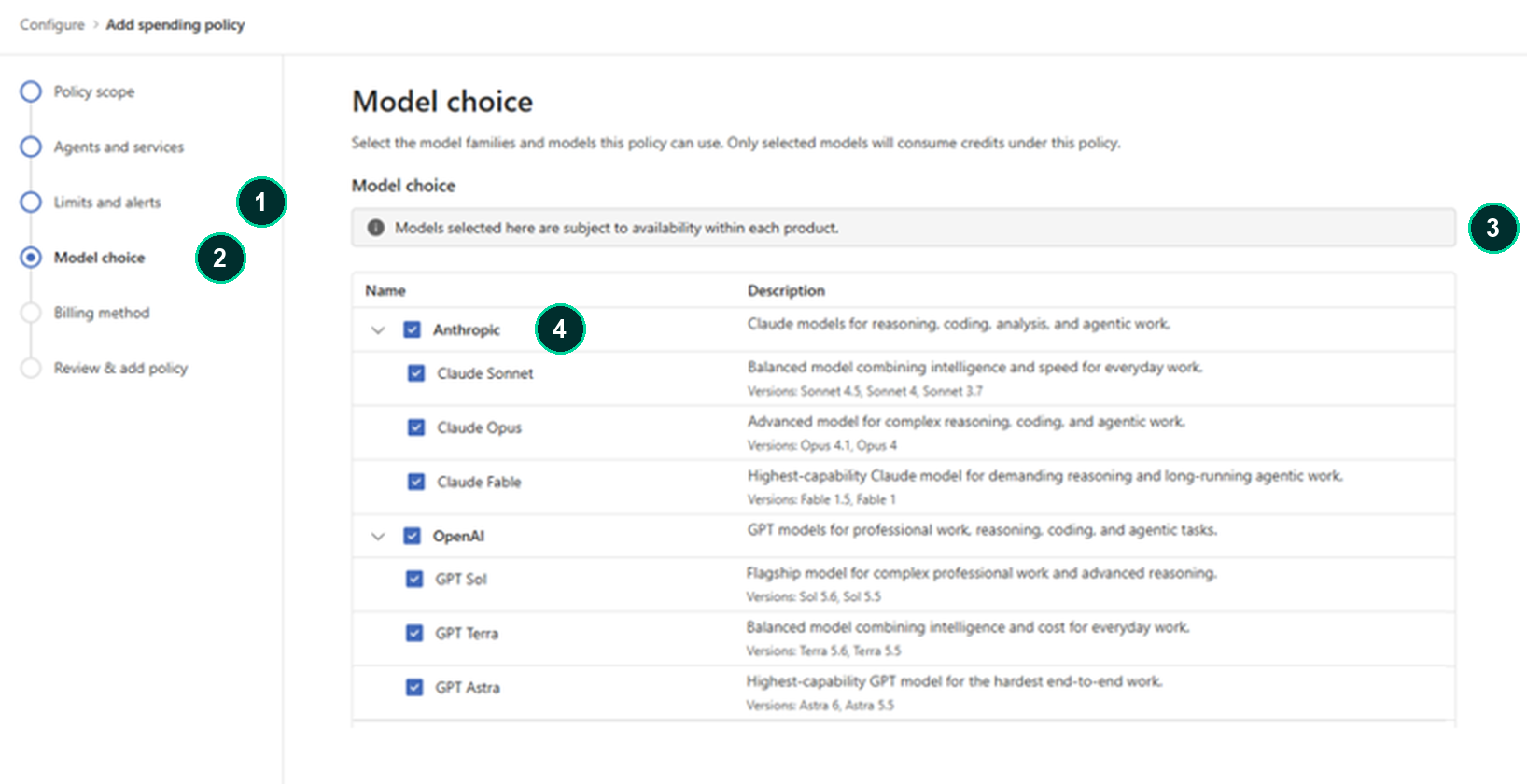
- Limits and alerts: set budgets, user caps and alert thresholds for the policy.
- Model choice: select the model families and models this policy can use. Only selected models consume credits under it.
- Availability notice: a model selected here still depends on its availability in each product.
- Model families: Anthropic and OpenAI families, each with individual models you can include or leave out.
Open image at full size
Availability: what to check in your organisation
- Licence: the Microsoft 365 Copilot user licence is required for both everyday and advanced AI.
- Default: for enterprise customers, usage billing is off until a spending policy exists. Microsoft has announced a different default from 2 November 2026 for new Microsoft 365 Copilot Business standalone and bundle purchases through CSP: pay-as-you-go billing will be enabled by default. This announcement does not establish the default for every existing Business customer or purchasing channel.
- Rollout: Copilot Studio agents join cost management from October 2026; group-level model choice is rolling out in Cowork first.
- Licence, access and region: Microsoft notes that model availability varies by all three.
- Keep it separate: consumer Microsoft 365 plans and other products, such as GitHub Copilot, have their own billing. Keep them out of this budget.
Reviewed 2 October 2026. Rollouts are phased; confirm availability against your licence and current Microsoft guidance.
Checklist for your IT and finance discussion
| Question | Owner |
|---|---|
| Who can create and change a Copilot spending policy? | IT admin |
| Which teams need advanced AI first, and which can stay on everyday AI? | Business owner |
| What monthly budget does each group get, and what user cap sits inside it? | Finance |
| At what spend level do alerts fire, and who receives them? | Finance and IT |
| What happens when someone nears a limit: a warning, a request, or nothing? | IT admin |
| Which Azure subscription or cost centre carries the spend? | Finance |
| Which models should each group be able to use? | IT admin and business owner |
| How often will you review usage against the value produced? | Business owner |
Frequently asked questions
Will our everyday Copilot use suddenly cost more?
Microsoft says there are no changes to the value in the user licence. Usage limits apply, and Microsoft expects most people never to reach them. Near a limit, people can switch to Auto at no extra cost.
Can someone run up a bill just by trying Cowork?
For enterprise customers, not until an admin creates a spending policy. Policies can also cap individual users and send alerts.
Do we need credits to choose a model?
No. Model selection is part of the user licence, with limits on some newer models. Credits apply to advanced work such as Cowork and frontier models.
Are Copilot Credits the same as AI features in consumer Microsoft 365 plans?
No. This article covers Microsoft 365 Copilot for organisations. Consumer plans are billed separately.
Related on Braintree
AI Jumpstart: connect your AI plans to your business strategy
Sources
Microsoft Learn. Release notes for Microsoft 365 Copilot. Accessed 1 October 2026
Microsoft Learn. Managing AI experiences enabled by usage-based billing. Accessed 2 October 2026.