


Put the essentials in place.
01
Customer and deal visibility
Keep accounts, customer interactions and opportunities accessible to the people working on them.
02
Sales and service workflows
Use a defined starting configuration for activities, queries and follow-ups, with responsibilities visible across the team.
03
Reporting and next steps
Bring customer activity into shared reporting and identify the work that needs attention.
04
A Dynamics 365 foundation
Build on Microsoft Dynamics 365 with scope to consider additional applications as your requirements change.
Agree the fit before deployment.
A packaged approach still needs a clear view of the records to migrate, the workflows to configure and the team that will use it. Confirm the scope, integrations, training, support and commercial terms with Braintree before agreeing a delivery plan.
THE PRODUCT IN PRACTICE
Inspect the customer workspace
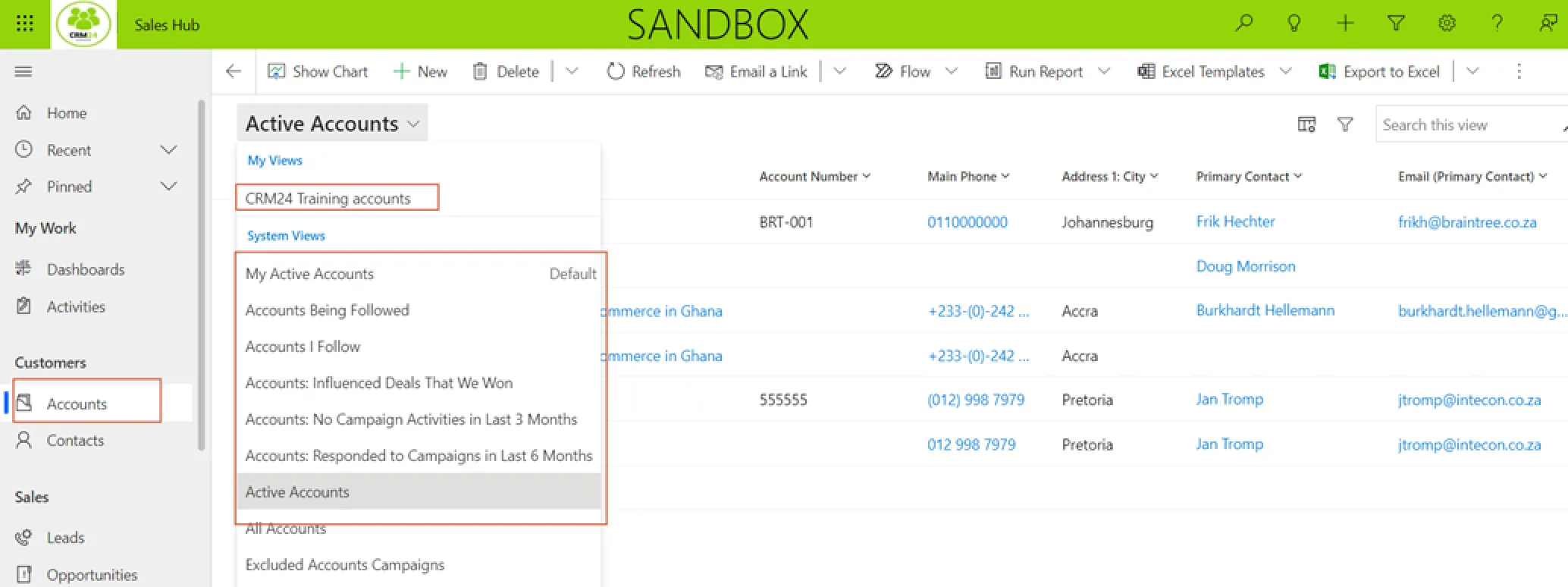
The published CRM24 guide shows the accounts workspace and its saved views. Use the guide to examine record setup and the relationship between accounts and contacts.
Read the workflow guide
01
Check whether your sales and service processes fit the package.
CRM24 is presented by Braintree as a packaged Microsoft Dynamics 365 CRM route. Its value depends on matching the defined configuration to the work your team needs to do. A sales team managing leads, opportunities and follow-ups has a different requirement from a service desk handling complex entitlements or a field team scheduling engineers and parts.
List the decisions your users make in a normal week. Include how a lead becomes an opportunity, who owns a customer query and what a manager needs to review. Compare those steps with a CRM24 demonstration. Record what fits the package, what needs configuration and what would require a wider Dynamics 365 engagement before committing to a scope.
02
Prepare a customer record your team can trust.
A contact import is a business decision as well as a technical task. Resolve duplicate companies, conflicting account owners and inconsistent pipeline stages. Decide which historical activities are useful and which records should be retained outside the new system. The source-data owner should approve the final dataset and the rules used to transform it.
Microsoft Dynamics 365 Sales supports accounts, contacts and the progression of sales activity. Access within Dataverse is controlled through roles and privileges. Your configuration therefore needs a clear view of who can read, update, assign and export customer information. Test these permissions with representative users, including a person who should not see another team’s records.
03
Demonstrate the handover that currently breaks.
Scenario
What to validate
A new lead arrives
Capture, ownership, qualification and the next action are visible to the responsible salesperson.
A colleague takes over
The new owner can understand the customer history and outstanding commitments without reconstructing the conversation.
A customer needs assistance
The query reaches an accountable person, progress is recorded and the customer receives a consistent response.
A manager reviews the week
Definitions of stages, amounts and activity are agreed so reports support the same decisions across the team.
04
Define the boundary with finance and communication.
A shared customer view does not automatically mean every email, telephone call, invoice or delivery status is integrated. List each required connection, its direction and the data it should exchange. Agree which application owns the customer record and who handles synchronisation errors. Validate these requirements against the CRM24 package.
Before go-live, the business owner should approve the configured workflow and the migrated data. The handover should identify user training, administrator responsibilities, support access and any excluded integrations or reports. Package scope and readiness determine the delivery plan; an individual project needs confirmed prerequisites and acceptance criteria.
EVIDENCE & DOCUMENTATION
See the work in context.
BEFORE YOU DECIDE
