
DOCUMENTATION
Setup and Configuration
Fixed Assets Maintenance Setup
Search for FA Maintenance Setup, or select Maintenance Setup from the Fixed Assets Setup page. On installation, number series will be created for:
Maintenance plans
Maintenance orders
Checklists
Transfers
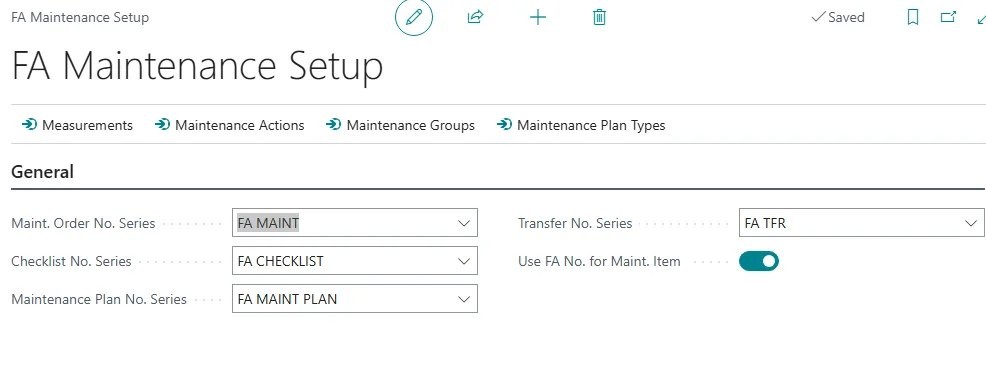
You can amend these if required.
Definitions
Definition of terms and entities used in the app:
Term | Definition |
|---|---|
Measurements | Defines key measurements taken as part of maintenance and inspections. |
Maintenance Actions | Defines actions that are used in maintenance activities, for example Check, Top up, Adjust. |
Maintenance Group | Defines a group for which common maintenance activities apply, for example Passenger Vehicles, Motorcycles, Fridges. |
Maintenance Plan Types | Defines categories of maintenance plans, for example Minor Service, Safety Certification. |
Maintenance Plans | Defines a set of standard activities and resource requirements for the maintenance of a particular group of assets. |
Maintenance Order | Defines specific maintenance actions. |
Checklist | |
Defect Register |
Measurements
From FA Maintenance Setup, select Measurements. From the Measurements list, add or edit the entries.
Example:

Maintenance actions
From FA Maintenance Setup, select Maintenance Actions. From the Maintenance Actions list, add or edit the entries.
Note:
it is not necessary to predefine all actions. They can be dynamically added during creation of maintenance plans.
Maintenance plan types
Maintenance plan types define broad categories of maintenance, for example inspection, minor service, major service, safety compliance. From FA Maintenance Setup, select Maintenance Plan Types. From the Maintenance Plan Types list, add or edit the entries:

Enter a code and description, and select a maintenance category from the available list. Optionally, add the person responsible for managing the maintenance of assets.
Maintenance groups
Maintenance groups are used to group a set of fixed assets together, based on common properties. The group can be used to associate typical maintenance activities with specific assets.
Example:
Motor vehicles can be split by size and fuel type, for example Passenger Petrol, Passenger Diesel. From FA Maintenance Setup, select Maintenance Groups. From the Maintenance Groups list, add or edit the entries:

Maintenance groups: plan types
You can associate plan types with maintenance groups. Select Maintenance Plan Types from the Maintenance Groups page.
Need help with your environment?
Use your agreed Braintree support channel, or contact the team to confirm the right support route.
Contact Braintree
